
Overview
Connecting the teleCalm adapter over the internet—either Wi‑Fi or Ethernet—typically provides better voice quality than relying on the built‑in cellular connection. A direct Ethernet connection offers the most stable performance, but it’s not always convenient or available in many homes or senior living apartments. In those cases, connecting the adapter over Wi‑Fi is the preferred option for improved reliability.
What You Need
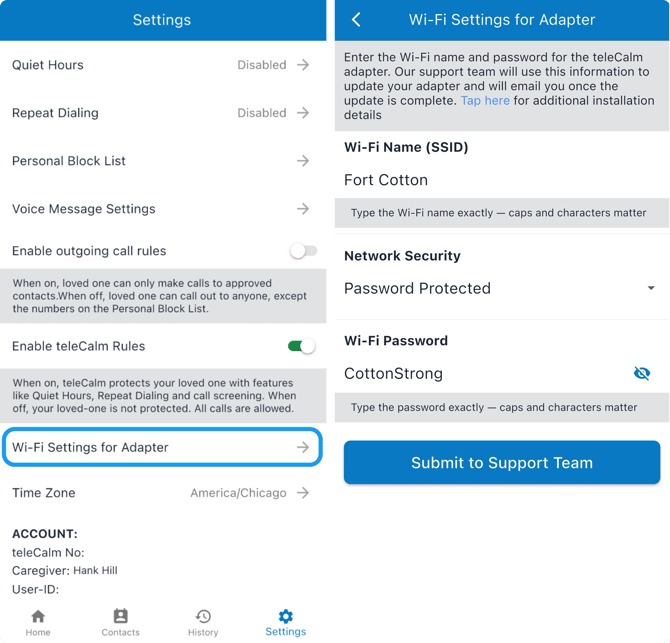
To connect your teleCalm adapter to Wi‑Fi, you will need to share your Wi‑Fi network name (SSID) and password within the teleCalm Caregiver App.
Important: Enter the Wi‑Fi name and password exactly as written, including capitalization, spaces, and symbols.
You can usually find your Wi‑Fi name and password on a label on your internet router—most often on the back or bottom near the ports. If you plan to use Wi‑Fi at a senior living community, you may need to ask the community staff for this information.
If you have ever connected to the Wi‑Fi on your own cell phone in the past, you may be able to access the Wi‑Fi name and password stored on your phone. For example, here’s how to find your saved WiFi passwords on an iPhone.
How Wi‑Fi Updates Are Applied
When you submit Wi‑Fi information through the Caregiver app or online form:
-
The details are securely sent to teleCalm Support.
-
A technician updates your adapter’s configuration.
-
The adapter must be powered on and online (via cellular or Ethernet) to receive the update.
-
Once applied, the adapter will reboot and automatically connect to the new Wi‑Fi network.
If the adapter is offline, the update will be applied the next time it reconnects.
When Wi‑Fi May Be Preferred
Wi‑Fi can provide a more stable connection when:
-
Your home has strong, consistent Wi‑Fi
-
Your senior living community has reliable Wi‑Fi coverage
-
Cellular reception inside the building or home is weak
Your service continues working over cellular until the Wi‑Fi update is successfully applied.
2.4GHz Wi‑Fi Only: The teleCalm adapter works only with 2.4GHz Wi‑Fi. Networks labeled “5G” or “5GHz” are not compatible. If your router offers both, be sure to choose the 2.4GHz network name (SSID).
Network Restrictions: Some senior living communities use network security that may block VoIP (internet phone) services like teleCalm. If your adapter appears connected to community Wi‑Fi but continues using its built‑in cellular connection, the Wi‑Fi is likely limiting teleCalm’s voice service. In this situation, the adapter will remain on cellular to keep calls working, which may increase your monthly cost.