
To participate in the teleCalm Mobile Early Access program, Google requires us to pre‑approve the exact Google Play account email used on the end user’s Android smartphone. If the wrong email is provided, the teleCalm Dialer app will not appear in Google Play for download.
Many people accidentally give us a Gmail address they use, but not the one actually signed in to Google Play on the phone. Follow the steps below to confirm the correct Google Play email.
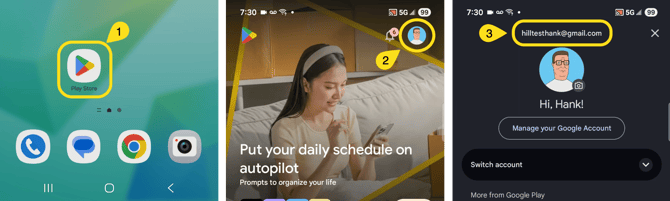
Step-by-Step: Verify the Google Play Account Email
-
Open the Google Play Store app -- On the Android phone, locate and tap the Play Store icon on the home screen.
-
Tap the profile icon -- In the top‑right corner of the Play Store screen, tap the profile circle.
-
Check the email address shown -- The email displayed at the top of the menu is the Google Play account currently signed in on the device.This is the email we must approve for Early Access.
If more than one account appears, the one at the top is the active Google Play account.