
When you prefer to set up teleCalm service to deliver dial tone to all of the phone jacks in the house, there are a few important steps to take to set this up.
The installation process is different if the previous phone service was provided by a cable TV / Internet provider (Spectrum, Xfinity, etc) versus a landline telephone company (AT&T, Verizon, etc).
-
For cable providers, you’re essentially moving the phone cord from the cable box to the teleCalm adapter.
-
For landline providers, you must first disconnect the outside phone company at the NID (Network Interface Device), then plug the teleCalm adapter into any phone jack.
Be sure to physically disconnect any existing phone company’s service from your home’s wiring first, as this step is necessary to safeguard the teleCalm equipment.
If Old Phone Service Is From a Cable Provider (Spectrum, Xfinity, etc.)
To set up teleCalm service when the previous home phone was connected through a cable or Internet box, follow these steps:
- Unplug the power and all cables from the teleCalm adapter.
- Locate the phone cord that connects the cable provider’s box to the wall jack.
- Unplug this phone cord from the cable box.
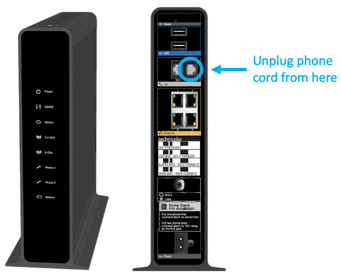
- Check the telephones to confirm that there is no dial tone.
- Insert that same phone cord into the available phone jack on the back of the teleCalm adapter.
- You should now see a phone cord running from the teleCalm adapter to the wall jack, with no phone cord attached to the cable box.
- Plug the power cable into the teleCalm adapter and allow 8 minutes for it to start up.
If Old Phone Service Is From a Traditional Landline Provider (AT&T, Verizon, etc.)
NOTE: This process is for private homes only. It will not work for apartments or in senior living communities.
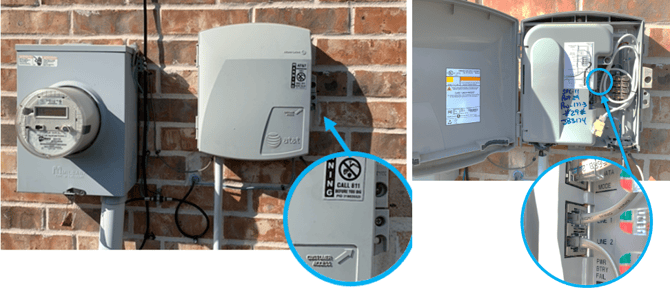
- Find the Network Interface Device (NID) on the outside of the house (often near the power meter).
-
- Open the panel labeled Customer Access (you may need a screwdriver).
- Inside, you’ll see one or more phone wires plugged into jacks.
- Unplug these wires to physically disconnect the outside phone company from the inside wiring.
- This step is critical to prevent damage to the teleCalm equipment.
- Close the panel to protect against weather.
- Back inside the house, check the telephones to confirm that there is no dial tone.
- Plug a phone cord (not provided) into the available phone jack on the back of the teleCalm adapter.
- Plug the other end of that cord into a wall jack inside the house.
- This will provide teleCalm dial tone into the home’s wiring, making it available at all jacks in the house.
If you need assistance at any point, our support team is ready to guide you through the setup or help resolve any issues.