Most Android smartphones allow you to disable the native Phone app so your loved one can only use the teleCalm Dialer. This prevents accidental switching and ensures all calls follow the protections you’ve set up in the Caregiver app.
Samsung Phones & the teleCalm Dialer
Many Samsung smartphones do not allow their built‑in Phone app to be disabled. Because of this, certain apps—such as Chrome, Messages, or other third‑party apps—may provide the user an option to switch back to Samsung’s Phone app instead of the teleCalm Dialer.
This behavior cannot be fully prevented on Samsung devices, but you can reduce the chances of it happening.
What This Means for teleCalm Mobile
If the end user taps a phone number inside another app, Samsung may show a prompt such as: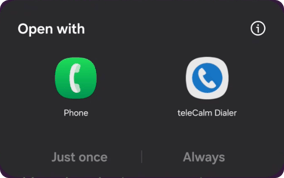
If they choose the Samsung Phone app, the call will bypass teleCalm’s protections.
This is why we strongly recommend using non‑Samsung Android phones whenever possible. But if you already have a Samsung device, the following steps help minimize the risk.
Workarounds to Reduce the Risk
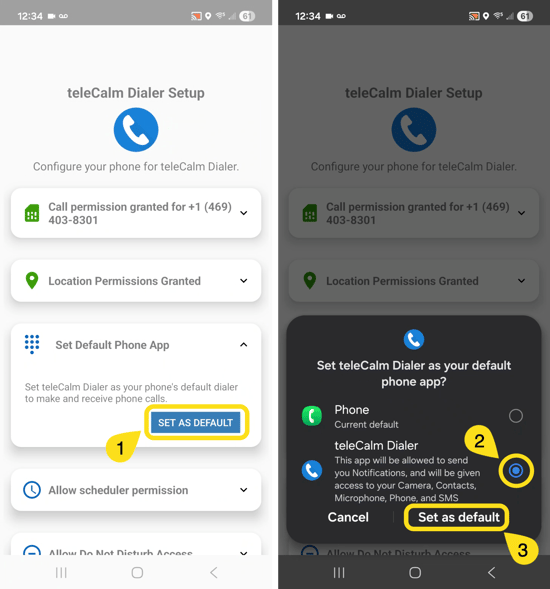
- Set teleCalm Dialer as the Default Phone App: This will happen during the setup process
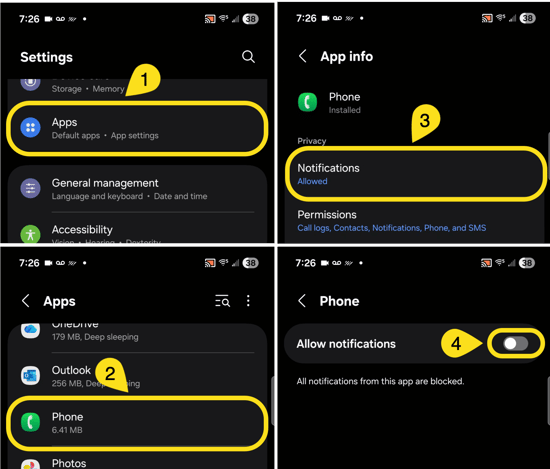
- Disable Notifications from Samsung’s Phone App: Go to Settings → Apps → Phone → Notifications
- Remove All Permissions from Samsung’s Phone App: Go to Settings → Apps → Phone → Permissions
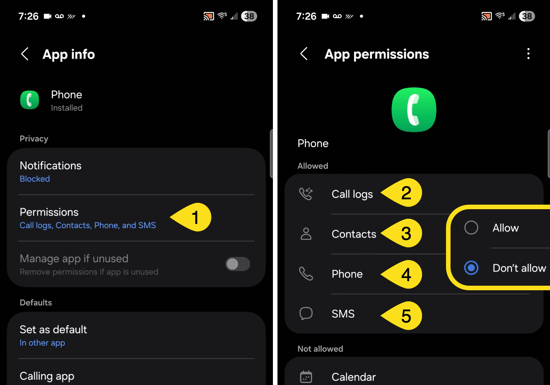
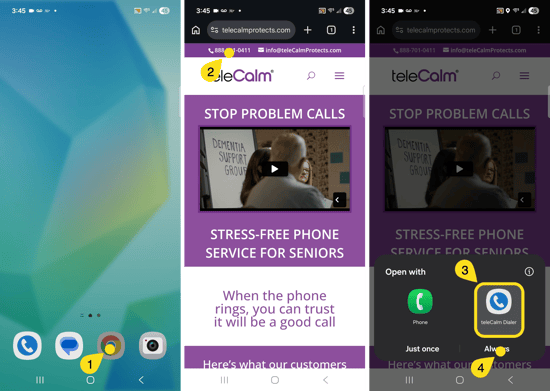
- Set Default Dialer in Chrome and Other Apps
- Open Chrome
- Go to webpage containing a phone number and tap on the phone number
- Select teleCalm Dialer
- Select Always
- Repeat as required with other apps